A signal is an indicator that through a displayed indication, conveys the status of the track ahead to Drivers passing it. This could be a signal, with 3 or 4 lights mounted on a pole (or gantry), shunt signals near the ground producing a white and red pattern, semaphore signals on the Rayleigh Bay Branch, and tram signals on the tram line between Berrily and Whitney Green (with a short gap at Greenslade).
Mechanics
Signals work by using sensors mounted on the track to check if a train is present. The sensor in question will then report its status to a signalling centre and will change the signal aspects behind it to tell Drivers that they need to slow down and stop as their route cannot be set due to a conflicting move or train in front.
Signal Identifier Meaning
As of Version 2.3, the signal identifiers have changed. The first letter of the signal represents the headcode of the location of the signalling desk of that signal. All signalling desks are located at termini. The second letter of the signal represents the region that the signalling desk covers. For example a signal with "YB" means it is controlled from the Berrily Rail Operating Centre.
The second letter of the signal represents the location of that signal. For example, a signal with "BN" means it is located in the Newry area.
- 1 - SW (Stepford ROC/Stepford West)
- 2 - SC (Stepford ROC/Stepford Central)[note 1]
- 3 - YB (Berrily ROC/Berrily)[note 1]
- 4 - BN (Benton Signal Box/Newry)[note 1]
- 5 - BE (Benton Signal Box/Benton)[note 1]
- 6 - GH (Hampton Hargate Signalling Centre/Hampton Hargate)
- 7 - AC (Airport Signalling Centre/Airport Central)[note 1]
- 8 - AE (Airport Signalling Centre/Airport East)
- 9 - LE (Llyn-by-the-Sea ROC/Leighton)
- 10 - LN (Llyn-by-the-Sea ROC/Llyn-by-the-Sea)[note 1]
Before Version 2.3, signal identifiers only contained one letter, and were based in the following regions below:
- A - St Helens Bridge to the Airport Branch via Morganstown [including Morganstown Triangle (Airport to LSR side), Airport West tunnel to Terminal 2, Airport Parkway Platforms 3-5 and Morganstown Platforms 1-4 and 6]
- C - Beechley Triangle to Willowfield, and Whitefield line
- D - All depots and sidings
- L - Leighton West Branch
- M - Barton Loop and Metro Core Section
- R - Rayleigh Bay Branch
- S - Stepford Main Line and Stepford Victoria Branch [including Morganstown Triangle (Morganstown to Hampton Hargate side), Airport Parkway Platforms 1-2, Benton Platforms 4-13]
- W - Entire Waterline network (excluding Airport West to Terminal 2, but including Benton Platforms 1-3 and Morganstown Platforms 5A/B)
Automatic Warning System
- Main article: Automatic Warning System
The Automatic Warning System (AWS) may apply if a yellow, double yellow or red signal is ahead. If the AWS is alerted, drivers must press the Q key, the X button on Xbox, the □ button on Playstation or click the yellow exclamation mark in the HUD to dismiss the AWS. Failure to do so within 6 seconds will trigger an instant emergency brake that lasts for 10 seconds by the Train Protection and Warning System.
Types of signals
Three- and four-aspect signals
The majority of the network uses four-aspect signals, as well as three-aspect signals in a few cases. These signals can display three or four different states.
A green aspect (Proceed) tells the driver that their route is clear and that they can proceed at line speed. The next aspect is usually green but can sometimes be (double) yellow. If this signal is shown, it will trigger an electrical ping from the AWS. This ping does not have to be acknowledged and is there to alert the driver.
A double yellow aspect (Preliminary Caution) tells the driver that their route is not clear after two signals ahead and they must slow down in preparation to stop at the red signal. The next aspect will always be yellow unless it changes as more of the train's route is clear. If this signal is next it will trigger an AWS sound in the form of a loud continuous beep and must be acknowledged by the driver by pressing Q, the X button on Xbox, the □ button on Playstation, or by clicking the warning symbol.
A yellow aspect (Caution) tells the driver that the next signal can be red (Danger) and that they must slow down in preparation to stop at the next signal. The next aspect will be red (Danger) unless it changes as the train's route is cleared or the Signaller sets the signal to caution. The speed limit on SCR past this aspect is 45 mph until the signal aspect clears to a less restrictive aspect. However, it is found in some places to designate a speed limit decrease to 45 mph. If this signal is next it will trigger an AWS horn in the form of a loud continuous beep and must be acknowledged by the driver by pressing Q, the X button on Xbox, the □ button on Playstation, or by clicking the warning symbol.
A red aspect (Danger) tells the driver that they must stop at this signal and they must come to a complete stop by the signal. They must not proceed past this signal and if they do, automatic emergency braking is applied and will bring the train to a halt. The term for passing this signal is Signal Passed at Danger (SPAD). The train has no clearance beyond this point. If this signal is next it will trigger an AWS horn in the form of a loud continuous beep and must be acknowledged by the driver by pressing Q, the X button on Xbox, the □ button on Playstation, or by clicking the warning symbol.
Semaphore signals
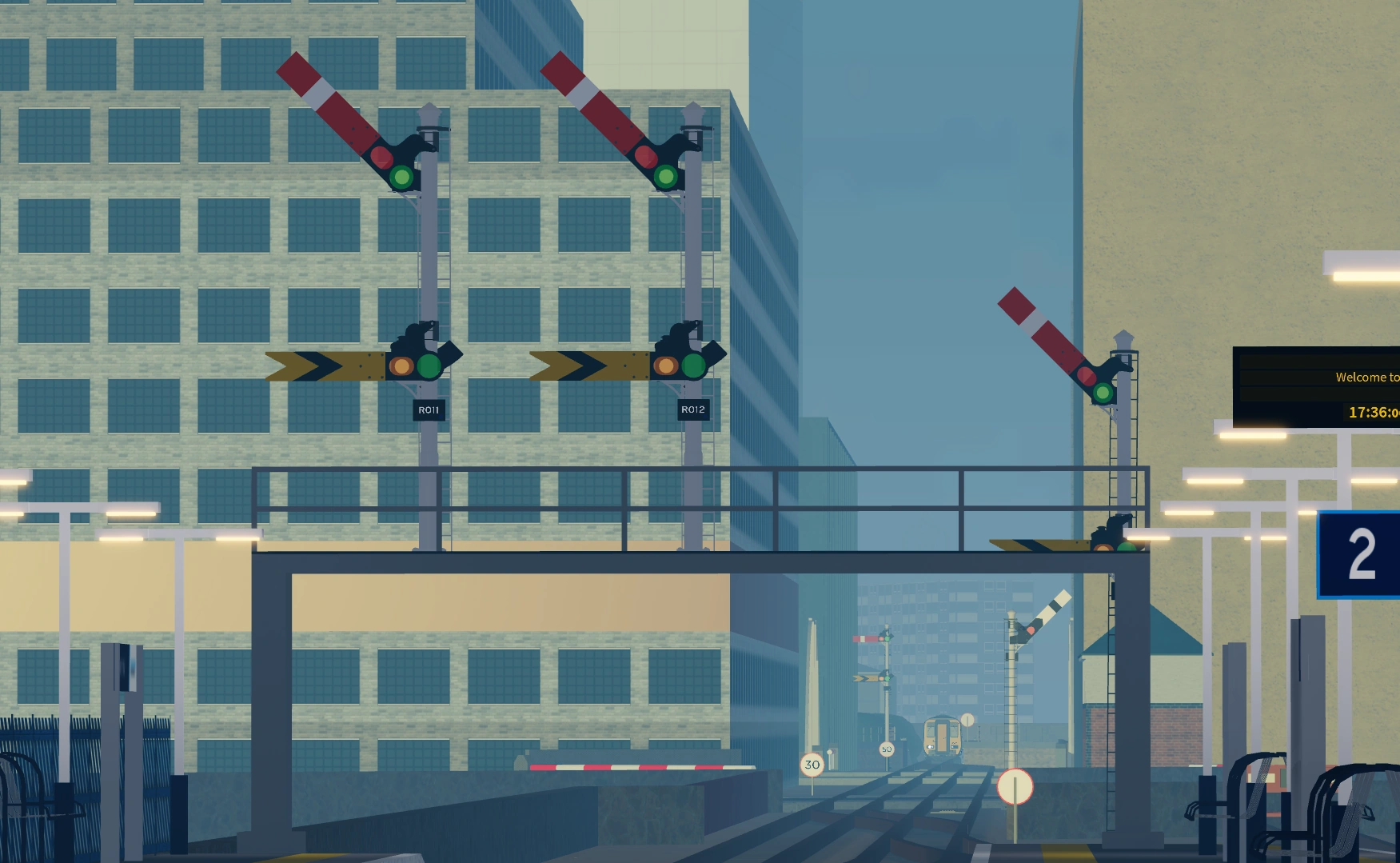

The sneak peek released showing semaphore signals.
Through a sneak peek, the introduction of semaphore signals was revealed on 18 April 2024, as part of Version 2.0. Semaphore signalling involves signals that display their different indications to train drivers by changing the angle of inclination of a pivoted 'arm'. The hands are animated. The semaphore signals in the game are of the "upper-quadrant" type, meaning the arms raise up to indicate "all-clear", and resemble the semaphore arms used by the LNER and LMS.
Semaphore signals come in two types, single and double. Double signals are the most common and have home and distant arms, meanwhile single home signals only have one red arm.
The red arm is known as a "Home" signal, and represents Danger, and the yellow arm is known as a "Distant" signal, and represents Caution. The signal arms have two settings: raised or lowered. If an arm is raised, the signal is “off”. If the signal arm is lowered, the signal is “on”.
If the danger arm (home arm) is lowered, it represents Danger. If the home arm is raised but the distant one is lowered, it represents Caution. If both arms are raised, it means Proceed. Single signals can only represent Danger and Proceed, as they lack the second arm required for representing Caution.
Semaphore signals are represented by the regular three-aspect signal in the driver UI.
Shunt signals
In all depots and sidings, shunt signals are used. Unlike other types of signals, they are mounted to the ground. Shunt signals have three lights in a triangular shape.
A double white aspect (Proceed) tells the driver that the route is clear to the next signal and that they can proceed at the speed limit, while being able to stop at the next signal if necessary. The next aspect can be any indication - another shunt signal at danger or proceed or a line signal at any aspect. If this signal is next it will trigger an electrical ping from the AWS. This ping does not have to be acknowledged and is there to alert the driver.
A double red aspect (Danger) tells the driver that they must stop at this signal and they must come to a complete stop by the signal. They may not proceed past this signal and if they do, automatic emergency braking is applied and will bring the train to a halt. The term for passing this signal is Signal Passed at Danger (SPAD). The train has no clearance beyond this point. If this signal is next it will trigger an AWS horn in the form of a loud continuous beep and must be acknowledged by the driver by pressing Q, the X button on Xbox, the □ button on Playstation, or by clicking the warning symbol.
Tram signals
Tram signals are a new set of signals added in Version 2.3, used on the Class 398-exclusive Greenslade branch, from Berrily to Whitney Green. The signals are made up of white LED dots arranged in a cross formation. A vertical straight line (Proceed) tells the driver that their route is clear and that they can proceed at line speed. The next aspect is usually set to proceed but can sometimes be a Danger signal.
A horizontal straight line (Danger) tells the driver that they must stop at this signal and they must come to a complete stop by the signal. They must not proceed past this signal and if they do, automatic emergency braking is applied and will bring the tram to a halt. The term for passing this signal is Signal Passed at Danger (SPAD).
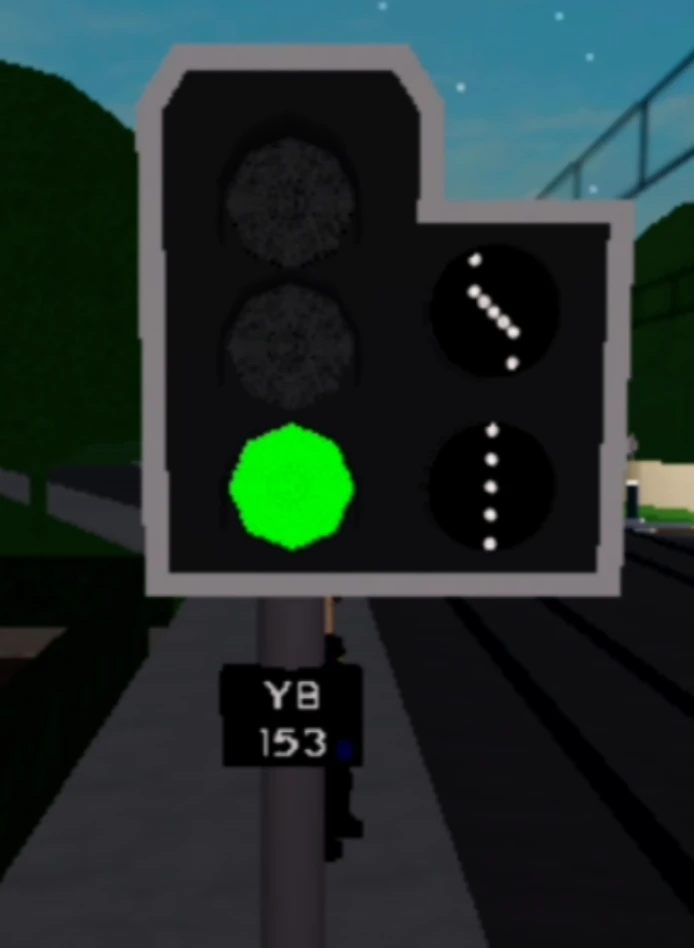

Route Indicator facing, and Infront of Whitney Green
Diagonal lines point left or right, telling the driver which route the tracks have been set to, like junction indicators on heavy rail lines. These can be seen on one traffic light just before, and facing, Whitney Green, which tells the driver which platform they are going to.
A white dot in the centre of the signal (perceived as Caution) tells the driver to stop unless it is unsafe to do so, for example, when too close to the signal and when speed prevents the driver from stopping. These are not used in SCR.
Indicators
There are two types of signal indicators: Feather and Alphanumeric. Both types are purely cosmetic and drivers are not required to make any additional input.
Junction indicators


Signal A126 displaying a left 'feather' and a right 'feather' at the oldMorganstown Triangle, indicating the train is headed towards Leighton Stepford Road and Stepford Central respectively


Signal W033 with only a left 'feather', indicating the train is headed towards Cambridge Street Parkway (on) and Port Benton (off) respectively
A junction indicator, colloquially known as a 'feather', is a type of signal that has one or two rows of white lights mounted above the aspect lights. When appropriate, they illuminate when the train is 0.1 miles from the signal to indicate the direction of divergence.
The addition of junction indicators was long requested by the community and they were sneak-peeked during Innovations Director BanTech's livestream on 6 January 2022 - despite never being formally sneak-peeked on the SCR Official Discord server.
Junction indicators are triggered upon passing the signal prior as only then can the route be detected. As a result, Signallers have no control over setting feathers before a train approaches a signal.
These indicators were added as part of Version 1.9 and are found at most junctions and multi-platform stations.
Alphanumeric route indicators


Signal S095 displaying 'M' and 'W' at Stepford East Platform 2, indicating 'Mainline' and 'Whitefield' respectively


Signal S349 displaying '1', '2' and '3' on the approach to Leighton Stepford Road, indicating Platform 1, 2 and 3 respectively
Alphanumeric route indicators (also known as theatre-style) are similar to junction indicators, but instead of rows of white lights indicating direction of divergence, a screen mounted on top of the aspect lights displays a letter or number, indicating the assigned route or platform.
Likewise with the junction indicators, they were teased during BanTech's livestream on 6 January 2022.
These indicators were added as part of Version 1.9.1 and are commonly found upon approach of a multi-platform station.
Locations
| Location | Symbols (bolded) |
Signal(s) Platform(s) |
In use for |
|---|---|---|---|
| Beechley station | Stepford Bay | SW 008, SW 010, SW 012, SW 014
Platforms 1-4 |
Any Metro route that terminates at Stepford Bay |
| Stepford Central/
Stepford Victoria |
Any Stepford Connect and Metro route that passes through the Beechley Triangle | ||
| Whitefield Lido station | Connect | SC 005 Platform 2 |
Any Stepford Connect route that passes through Stepford East |
| Metro | Any Metro route that passes through Stepford High Street | ||
| St Helens Bridge station | Benton | YB 099, YB 101 Platforms 3 & 4 (Eastbound) |
Any Stepford Connect and Metro route that goes via Benton from St Helens Bridge |
| Morganstown | Any Stepford Connect and Metro route that runs on the Morganstown branch | ||
| Connect | YB 094, YB 093 Platforms 4 & 5 (Westbound) |
Any continuing Stepford Connect route towards Stepford East | |
| Metro | Any continuing Metro route towards Stepford High Street | ||
| After Barton station | Berrily | YB 075 | Any Metro route towards Berrily |
| Elsemere Junction | Any Metro route towards Elsemere Junction | ||
| Berrily station | Barton | YB 172, YB 031, YB 032, YB 034
Platforms 1, 2, 4 |
Any Metro route towards Barton |
| Elsemere Junction | Any Stepford Connect and Metro route towards Elsemere Junction | ||
| Greenslade station | Tram | YB 173, YB 174
Platforms 2 & 4 |
Any Metro route that terminates at Whitney Green |
| Waterline | Any Waterline route | ||
| Benton station | Benton Bridge (Station) | BE 019, BE 020, BE 021, BE 008
Platforms 4-7 |
Any Stepford Connect route that stops at Benton Bridge |
| Fast | Any Stepford Connect and Stepford Express route that runs on the fast line to Hampton Hargate | ||
| Port Benton | Any Stepford Connect and Metro route towards Port Benton | ||
| Morganstown Docks station | Greenslade | GH 080 Platform 1 |
Any Waterline route that terminates at Greenslade |
| Morganstown | Any Waterline, Stepford Express and Metro route that runs via the Morganstown Flyover | ||
| Morganstown station | Morganstown (Branch) | GH 015, GH 016,
GH 017, GH 018 (Westbound) |
All Stepford Connect, Stepford Express, AirLink and Metro routes via Berrily |
| Benton | All Waterline routes, all Stepford Express routes via the Morganstown Flyover and Metro trains running R137 | ||
| Airport | GH 009, GH 012
Platforms 2-3 (Eastbound) |
Any AirLink route towards Stepford Airport Central | |
| Mainline | Any Stepford Connect and Stepford Express route towards Hampton Hargate | ||
| Stepford Airport Central station | Fast | AC 023, AC 025, AC 026 Platforms 4-6 (towards Airport Parkway) |
Any AirLink route |
| Slow/Stopper | Any Stepford Connect route | ||
| Terminal 1 | AC 020, AC 022 Platforms 3-4 (towards Terminals) |
Any AirLink route towards Airport Terminal 1 | |
| Terminal 2 | Any AirLink route that goes to Airport Terminal 2 directly | ||
| Airport West station | Airport | AE 011 Platform 1 |
Any route that goes toward Airport Terminal 2 |
| Esterfield | Any route that continues along the Esterfield Branch | ||
| Hampton Hargate station | Airport | GH 049, GH 048, GH 060, GH 056
Platforms 1-4 (Westbound) |
Any Stepford Connect and AirLink route towards Stepford Airport Central |
| Benton | Any Stepford Connect and Stepford Express route that runs on the fast line to Benton | ||
| Connect | Any Stepford Connect route that stops at Benton Bridge | ||
| Morganstown | Any Stepford Connect and Stepford Express route towards Morganstown | ||
| Fast | GH 057, GH 061
Platforms 1 & 3 (Eastbound) |
Any Stepford Connect and Stepford Express route that runs on the fast line to Water Newton | |
| Slow/Stopper | Any Stepford Connect route that runs on the slow line to Upper Staploe | ||
| Llyn-by-the-Sea approach | Line A/C | LN 102 | Any Stepford Express route that terminates at Llyn-by-the-Sea |
| Location | Symbol(s) | Signal(s) | In use for |
|---|---|---|---|
| Willowfield | 1, 2, 3 | C088 | Stepford Connect and Metro trains terminating at Platforms 1-3 |
| Beechley | 3, 4 | C060A | Stepford Connect and Metro trains terminating at Platforms 3-4 |
| Stepford Victoria | 1, 2, 3 | S002 | Stepford Connect and Metro trains terminating at Platforms 1-3 |
| 4, 5, 6 | S004 | Stepford Connect and Metro trains terminating at Platforms 4-6 | |
| Stepford Central | 0, 1, 2, 3 | S024 | Stepford Express trains terminating at Platforms 0-3 |
| 4, 5, 6, 7, 8, 9 | S026 | Stepford Connect trains terminating at Platforms 4-9 | |
| 12, 13, 14, 15 | S030, S032, S034 | AirLink trains terminating at Platforms 12-15 | |
| A | M104 | Metro trains arriving at Platform A | |
| B, C | M104, M111 | Metro trains arriving/terminating at Platforms B-C | |
| D | M111 | Metro trains arriving at Platform D | |
| Stepford East | 1, 2 | S085 | Stepford Connect trains arriving at Platforms 1-2 |
| 3, 4 | S108, S110 | Stepford Connect trains arriving at Platforms 3-4 | |
| A, B | M121 | Metro trains arriving at Platforms A-B | |
| C, D | M126, M127 | Metro trains arriving at Platforms C-D | |
| Stepford High Street | A, C | M132 | Metro trains arriving at Platform A & C |
| Stepford UFC | 1, 2 | C011 | Metro trains terminating at Platforms 1-2 |
| 3 | Stepford Connect trains arriving at Platform 3 | ||
| Whitefield | 1, 2, 3 | C045 | Stepford Connect trains terminating at Platforms 1-3 |
| St Helens Bridge | 3 | S127, M140 | Stepford Connect and Metro trains arriving at Platform 3 |
| 4 | Stepford Connect and Metro trains arriving at Platform 4 | ||
| S140, A002 | Stepford Connect and Metro trains arriving/terminating at Platform 4 | ||
| 5 | Stepford Connect and Metro trains arriving at Platform 5 | ||
| Bodin | 2, 3 | S168 | Stepford Connect and Metro trains arriving at Platforms 2-3 |
| Coxly | 1, 2 | S195 | Stepford Connect and Metro trains arriving at Platforms 1-2 |
| Newry | 1 | W060 | Waterline trains terminating at Platform 1 |
| 2 | Waterline and Stepford Express trains terminating at Platform 2 | ||
| 3 | Waterline and Stepford Express trains terminating at Platform 3 or heading to Newry Harbour | ||
| Benton | 4, 5, 6, 7 | S227 | Stepford Connect and Metro trains arriving at Platforms 4-7 |
| S187 | Stepford Express trains arriving at Platforms 4-7 | ||
| 8, 9 | S185 | Stepford Express trains terminating at Platforms 8-9 | |
| 6 | S242 | Stepford Connect trains terminating at Platform 6 | |
| 8, 10, 11, 12, 13 | Stepford Connect, Stepford Express and Metro trains arriving at Platforms 8, 10-13 | ||
| 11, 12, 13 | S240 | Stepford Connect, Stepford Express and Metro trains arriving at Platforms 11-13 from Benton TMD | |
| Metro trains arriving at Platforms 11-13 from Port Benton | |||
| S238 | Stepford Connect and Metro trains arriving at Platforms 11-13 from Port Benton via loop | ||
| Morganstown | 1, 2 | A059 | Stepford Connect and Metro trains terminating at Platforms 1-2 |
| 1, 2 | W117 | Metro trains terminating at Platforms 1-2 | |
| 3 | Stepford Express trains arriving at Platform 3 | ||
| 5 | Waterline trains terminating at Platforms 5A and 5B | ||
| Greenslade | 1, 2 | W003 | Waterline trains terminating at Platforms 1-2 |
| 1, 2, 3 | W100 | Waterline trains terminating at Platforms 1-3 | |
| Esterfield | 1, 2, 3, 4 | W168 | Waterline trains terminating at Platforms 1-4B |
| Stepford Airport Central | 0, 1, 2 | S701 | Stepford Connect trains arriving at Platforms 0-2 from Stepford Airport Parkway |
| 3, 4, 5 | A179 | AirLink trains arriving at Platforms 3-5 from Stepford Airport Parkway | |
| 4, 5, 6 | A200 | Stepford Connect and AirLink trains arriving at Platforms 4-6 from Airport Terminal 2 or Farleigh TMD | |
| Airport Terminal 2 | 1, 2, 3, 4 | A213, A218 | Stepford Connect, Waterline and AirLink trains arriving at Platforms 1-4 |
| Airport Terminal 3 | 1, 2, 3 | A223, A227 | AirLink trains arriving at Platforms 1-3 |
| Leighton Stepford Road | 1 | S349 | AirLink trains terminating at Platform 1 |
| 2, 3 | Stepford Connect and Stepford Express trains arriving at Platforms 2-3 | ||
| 4, 5 | S342, S344 | Stepford Connect and Stepford Express trains arriving at Platforms 4-5 | |
| Leighton City | 1, 2, 3, 4 | S355, S357 | Stepford Connect and Stepford Express trains arriving at Platforms 1-4 |
| 3, 4, 5, 6 | S368, L009 | Stepford Connect and Stepford Express trains arriving at Platforms 3-6 | |
| Llyn-by-the-Sea | 0, 1, 2 | S564 | Stepford Express trains terminating at Platforms 0-2 |
| 3, 4, 5, 6 | S565 | Stepford Express trains terminating at Platforms 3-6 | |
| 7, 8, 9, 10, 11 | S566 | Stepford Connect trains terminating at Platforms 7-11 |
Trivia
- Attempting to set a shunt or tram signal to caution by pressing
2as a Signaller will print a warning output in the developer console. - Some shunt signals are permanently on danger, such as the signal W170 at Esterfield Platform 4B and those at unused depot and siding lanes.
- Some of these shunt signals can also be interacted with in the signalling GUI, but cannot change states.